.png)
Error Message: Can't Log In Due to Excessive Login Attempts
For non-SSO users, the Engagement Hub requires a Username/Password to log in. If you fail to enter your password correctly after 4 attempts, you will be locked out and receive a notice, "This Account has been locked due to excessive login attempts". At this point, you will not be able to log in even if you enter your password correctly.
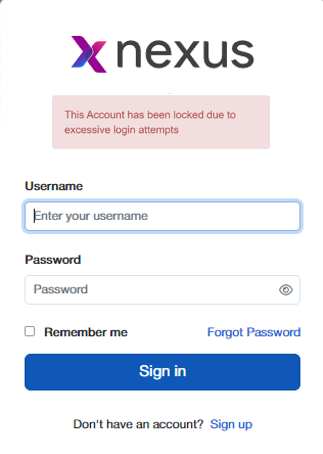
Click on the 'Forgot Password' link at the bottom of the login window. You will see a place where you can enter your email address. It is important to use your company email address that was used when initially creating your account. When you have entered your email address, click on the 'Reset Password' button. You will see the message, "An email has been sent to the specified user if they exist" and a password reset email will be sent to the email address. This same message is show whether or not the email address you entered is the one on file for your account. For security purposes, The Engagement Hub cannot give any indication as to whether or not the email address match. If the email address entered does not match what is on file, no email is sent.
The password reset email will show you your current username and give you instructions for resetting your password. Note: you can reset your password to what it was, if you can remember it. The new password can be the same as the 'old' password. The process of resetting your password will remove the login block and allow you to try to login again.
What if I don't receive the password reset email?
If you don't receive the password reset email after a few minutes, you should first check your spam folder. If you're not sure if you entered the correct email address, you can go back to the login screen and go through the process again.